
Troubleshoot Composite products
Start with the symptom below. POM Tweaks preserves the last valid saved configuration when an editor, import, or server validation fails.
The Composite product type is missing
Confirm WooCommerce is active, then go to Settings → POM Tweaks → E-Commerce → Products and enable Composite products. On multisite, check the current site rather than assuming another site's setting applies.
Disabling the tweak removes its product editor, storefront, REST, cart, order, and Blocks behavior without deleting saved product or historical order data.
The product will not save
Read every WooCommerce error notice and expand the named chapter or rule. Common causes are:
- a chapter with no valid source;
- the same product explicitly included and excluded;
- a default variation outside the chapter source;
- contradictory minimum, maximum, or exact quantities;
- an incomplete pricing, scenario, or compatibility row;
- a missing product, variation, category, or image;
- a linked reusable chapter that must be restored, detached, or relinked; or
- an impossible scenario or compatibility cycle.
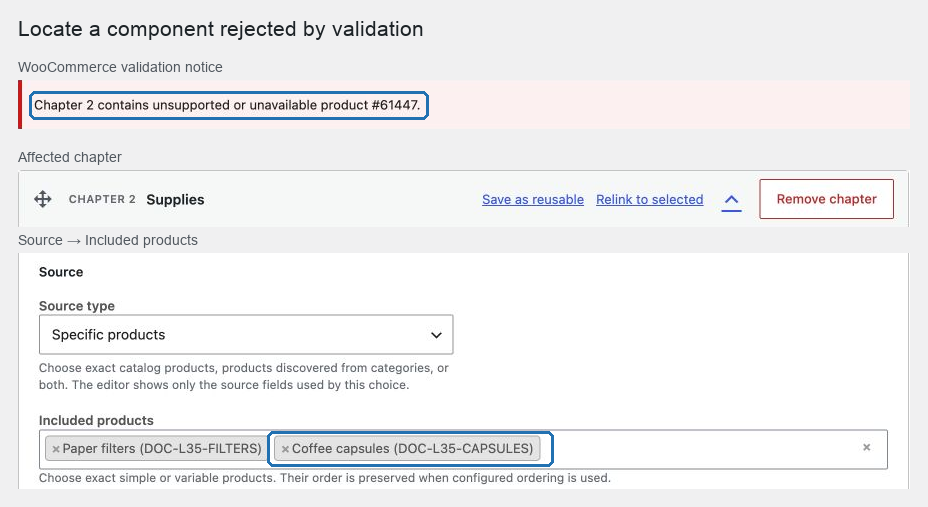
Correct the named path and save again. Do not assume that a browser-side field change was stored after a rejected request.
The total is unavailable
The storefront does not trust a browser-calculated price. Check that every required visible chapter is complete, quantities satisfy chapter and global limits, variations are purchasable, stock is sufficient, compatibility rules are met, and required component Add-Ons are complete.
Use Update total again after a temporary network error. The previous total is intentionally cleared and add to cart remains disabled until a current quote succeeds.
“Loading component options…” remains visible
This message means the selected catalog product has POM Product Add-Ons and the configurator is loading the full field contract needed to render and validate them. Products that the lightweight catalog summary confirms have no Add-Ons skip this request and never show the message. Full contracts are shared across matching selections on the page, and initial selected products load with bounded concurrency.
If loading times out, use Reload component options. Confirm the Product Add-Ons configuration is published and within its supported limits. A file-upload Add-On or another unsupported field blocks that component rather than accepting an incomplete cart payload. A temporary request failure does not silently remove required fields.
Options are missing
For a category chapter, confirm whether Category membership is Dynamic or Snapshot. A snapshot changes only when the Composite product is saved. Also review explicit product and category exclusions, product publication, variation availability, stock, and scenario exclusions.
The built-in component contract accepts published simple products and purchasable variations of variable products. Product search and category sources intentionally omit subscription, variable-subscription, grouped, external, and Composite product types. Type at least one character from a product name or SKU in the product editor's selector. If a category contains only one of those unsupported types, replace the source with supported products or use a purpose-built integration that implements the full storefront, recurring billing, cart, order, and renewal lifecycle before extending component eligibility.
Search and filters query the configured source; they do not grant access to an option outside it. A selected product that becomes unavailable is removed during revalidation.
The builder or summary appears in the wrong place
Open Storefront layout and review Builder position, Builder hook priority, Summary position, and Hook priority. In every layout, including Slot builder, the builder and summary are independent and the theme must execute the selected allowlisted WooCommerce hook; long-description placement also requires a non-empty product description. When a builder is placed outside the default add-to-cart area, the only parent-quantity control stays with Product Add-Ons and the add-to-cart button in WooCommerce's normal purchase column. Its minus, plus, and direct-input changes update the configurator and fixed product bar without requiring the active theme's quantity script. If the selected summary hook does not run, POM Tweaks uses one inline fallback summary inside the configurator.
Shipping or totals differ from expectations
Review the product Shipping mode, each chapter's shipping setting in partial mode, the parent and component tax classes, “prices entered with tax,” coupon restrictions, and regional fixed amounts. Use Price and ship Composite products to trace the calculation order.
Run the read-only diagnostic
On a staging or support session, select the exact site:
wp pomtweaks composite-products diagnose --url=https://example.comA complete healthy scan reports no errors or broken references and is not truncated. Use --max-products, --batch-size, and --details-limit within the command's documented bounds for a larger catalog. The command reports product IDs and issue codes without printing customer selections, product names, request bodies, or credentials, and it does not repair data.
Use wp help pomtweaks composite-products diagnose for the installed options and exit-code summary.