
Reuse and transfer Composite chapters
Reusable chapters keep a shared decision consistent across several Composite products. JSON export and import transfers a complete product configuration between products or sites after every catalog reference has been checked.
Save and insert a reusable chapter
- Edit a Composite product and finish one chapter, including its source, limits, display, pricing, and shipping choices.
- Select Save as reusable, enter a library name, and confirm.
- Edit another Composite product and choose the entry under Reusable chapters.
- Select Insert linked when future library updates should reach this product.
- Select Insert copy when the new chapter should be independent.
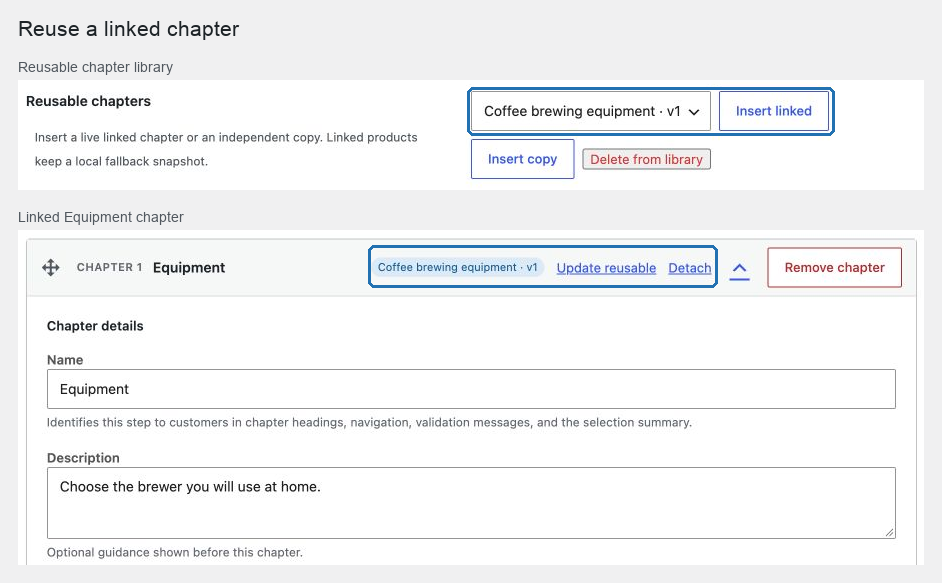
A linked chapter inherits the complete shared definition. Its chapter identifier and URL parameter remain local to the product so scenarios, compatibility rules, saved selections, and URL keys stay attached to the correct use.
To publish edits from a linked chapter, use Update reusable. Use Detach to preserve the current values as an independent copy. Relink to selected replaces the complete local definition with the selected library entry; it does not keep hidden field overrides.
If a linked entry is unavailable, the storefront uses the product's last resolved fallback. The editor requires you to restore, detach, or relink the chapter before saving that relationship.
Export a configuration
Open Product data → Composite chapters, find Import or export at the bottom of the editor, and select Export JSON. The file includes labels, chapter sources, exclusions, frozen snapshots, defaults, pricing, rule order, layout, scenarios, compatibility, limits, display, image references, reusable relationships, and shipping.
Export stops rather than creating a partial file when a required reference cannot be represented.
Import safely
- Open the destination Composite product.
- Under Import or export, choose a POM Composite
.jsonfile no larger than 1 MB. - Review every preflight row.
- Resolve all missing, ambiguous, and incompatible references.
- When the editor reports Import validated, review the complete configuration and publish or update the product.
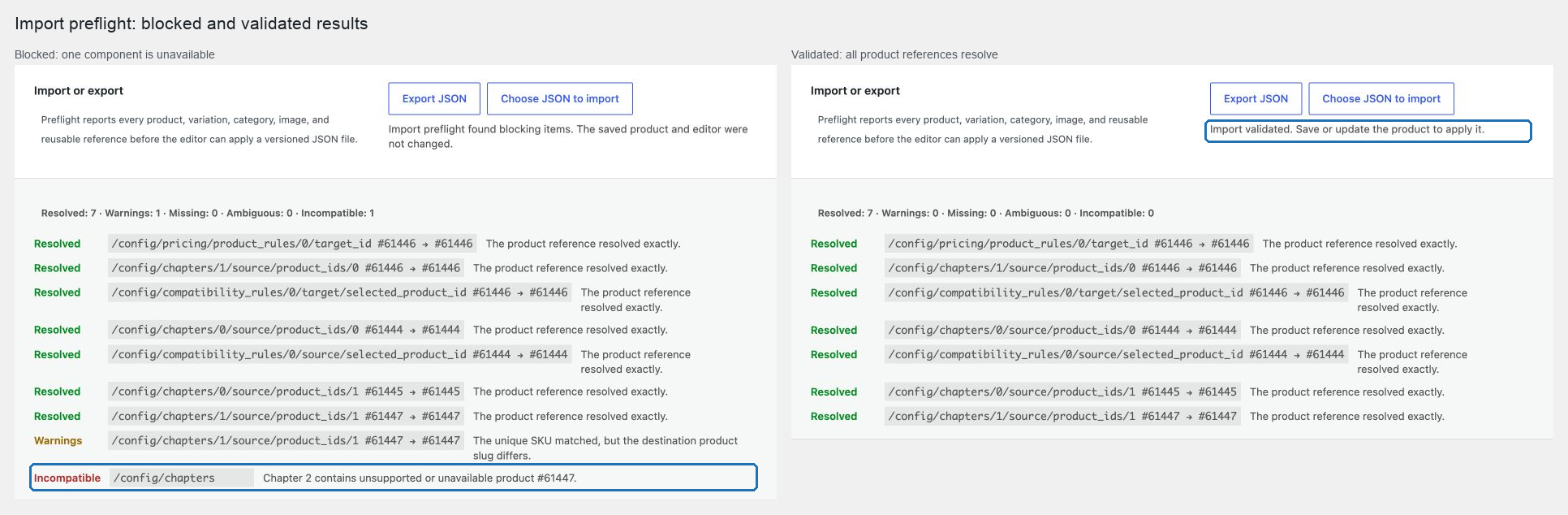
Products transfer primarily through an exact, unique SKU. Variations also require a matching parent and attribute combination. Product categories use the exact product_cat slug. Placeholder images must already exist with matching identity and content. Numeric IDs are hints only and never authorize attaching a different object.
Reusable entries preserve their link only when their portable identity and behavior match. Otherwise, the preflight either creates an explicit independent copy in the product or blocks a collision; importing never overwrites the reusable library.
Current exports use format: pom-composite-product and schema_version: 3. Schema 1 and 2 files are upgraded in memory before preflight, with URL synchronization disabled when the older schema did not contain that setting. A future schema is rejected rather than guessed. The file does not contain site URLs, users, credentials, server paths, or embedded image bytes.
Verify the transfer
After saving the destination product, compare chapter order, sources, exclusions, defaults, pricing-rule order, scenarios, compatibility, layout, labels, images, shipping, and reusable status with the source. Place one test order on the destination site. Current catalog prices and availability are always used; the JSON file is not a price token.