
Share Composite configurations
Composite Products can reflect selected chapter items in the product URL. This is useful for sales links, campaign landing pages, customer support, and returning to a configuration without treating the URL as trusted price or availability data.
Enable a chapter URL parameter
- Edit the Composite product.
- Open the chapter's Storefront display section.
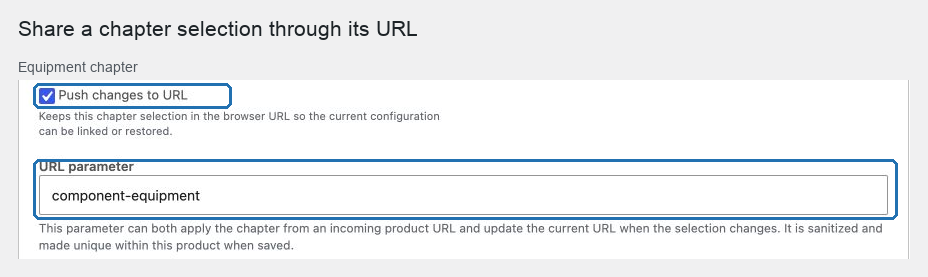
- Enable Push changes to URL.
- Review URL parameter and save the product.
- Open the product page, make a selection, and copy the updated address.
POM Tweaks sanitizes the key, gives it a component- prefix when necessary, and adds a suffix when two chapters request the same key.
Understand the value format
A chapter value is a comma-separated list:
https://example.com/product/build-a-box/?component-snacks=1x2339,2x2400:24011x2339selects one unit of simple product2339.2x2400:2401selects two units of variation2401under product2400.~deliberately clears the chapter, including a default or preset selection.
Changing the selection updates the current URL without adding a browser-history entry for every click. Other query parameters and the fragment are preserved.
Privacy and validation boundaries
Use URL sharing for catalog choices, not private text. A URL can appear in browser history, analytics, screenshots, copied messages, and server logs. Component file uploads are never placed in the URL.
The URL expresses intent only. On load, POM Tweaks checks current source membership, exclusions, variation ownership, stock, purchasability, scenarios, compatibility, quantities, Product Add-Ons, and server price. An altered URL cannot make an unavailable product purchasable or set a price.
Recognized configuration parameters are protected from shared caching and referrer propagation. Each decoded chapter parameter is limited to 4 KB; when a selection becomes too large to restore safely, POM Tweaks removes that chapter parameter instead of publishing a broken link.
Combine URLs with presets and saved configurations
When a URL contains preset plus explicit chapter or Add-On parameters, the preset supplies the starting configuration and the explicit values override only the keys they name.
When the separate Saved Product Configurations tweak is enabled, use Product presets for named, product-owned starting points. Use Saved Product Configurations for customer-owned configurations, expiring share links, and account reopening.
See Create a shareable sales configuration for a complete workflow.