
Manage Composite carts and orders
Every valid configuration becomes one linked parent cart line plus one real technical line for each selected component. This preserves the identity WooCommerce needs for stock, tax, coupons, shipping, Blocks, REST responses, orders, and refunds without requiring every technical line to be shown in the classic cart.
What customers see in the cart
The classic cart, classic mini-cart, and classic checkout review show one customer-facing parent row. Its configuration details group the selected components by chapter; every component uses a compact thumbnail, product name, and right-aligned quantity. The visible parent price and subtotal represent the complete linked configuration. Empty chapters are omitted.
The parent quantity is the number of complete identical configurations. Quantities inside its component list describe one configuration, while the hidden technical component quantities equal the parent quantity multiplied by that saved amount.
Removing the parent removes the complete group. Each independently added configuration gets its own identity, so two visually identical builds do not merge accidentally.
Cart and Checkout Blocks and the Store API continue to expose the linked parent and component rows because they consume the structured cart-line contract instead of WooCommerce's classic <dl class="variation"> markup. POM Tweaks refreshes the authoritative quote during totals and again before checkout. A current price, tax context, stock state, or product configuration can therefore update the cart or block checkout with an actionable notice.
Coupons and Product Add-Ons
In Fixed total mode, the parent owns the price and component rows are zero-priced. In calculated and base-plus-components modes, charged components retain their real product and category identities, so WooCommerce coupon rules apply to each eligible non-zero line.
Supported POM Product Add-Ons on a component remain visible in cart and order metadata. Their price enters the Composite allocation exactly once.
Add to cart revalidates each component Add-On against the same current price and regional context used by the visible Composite quote. This includes the component's exact country-pricing revision rather than the structural parent revision. An unchanged valid configuration is accepted; if an Add-On definition, price, availability, or market context actually changes before insertion, the customer is asked to review the new configuration instead of receiving a stale cart line.
What an order stores
Checkout creates ordinary WooCommerce line items. The parent shows a readable Configuration summary. Component lines show Chapter and Part of, followed by accepted Add-On labels and values.
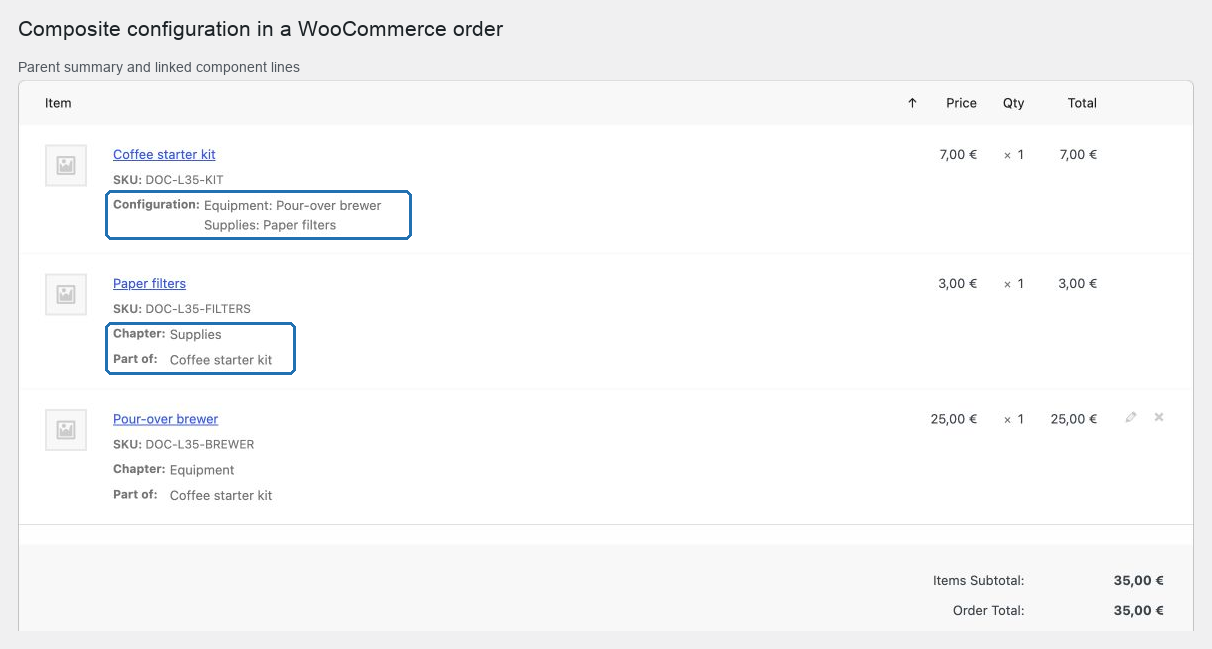
The order also keeps an immutable snapshot of the selection, quantities, SKUs, Add-Ons, quote identity, currency context, line allocation, tax classes, dimensions, and shipping modes. Historical orders use their stored totals and are not recalculated from the current catalog.
Edit, refund, or order again
- To change an order quantity, update the parent and every component proportionally. A mismatched group is refused.
- Do not delete a single component line. Remove the complete configuration group when the order must be changed.
- Refunds operate on the linked group. Enter the parent configuration quantity and the matching amount; POM Tweaks adds the required component refund rows and prevents stock from being restored twice.
- Order again starts from the historical parent, then rebuilds and re-quotes one new complete configuration with current catalog data. If the current definition is no longer purchasable, WooCommerce displays a notice instead of adding a partial group.
Operational verification
Before launch, test the classic cart, Cart and Checkout Blocks, the payment method used by the store, stock reduction, a coupon, one refund, and Order again. If the store uses HPOS, webhooks, or an external order integration, verify that system with a real staging order as well.