
Build a regional product bundle
Use this pattern when the same Composite product needs different fixed amounts by POM Country Pricing zone while component prices also follow the customer's resolved market.
Prerequisites
- Enable and configure Country pricing zones on the current site.
- Give every selected product the intended regional price or inheritance behavior.
- Decide which Composite fixed amounts vary by zone and which should inherit the global value.
Configure regional pricing
- Create or edit a Composite product and open Pricing and global limits.
- Choose Fixed total, Calculated from components, or Base price plus components according to the commercial model.
- Enter the global Fixed total or Base price as the fallback.
- Under Country-zone fixed amounts, enter a value only for zones that need an override. Leave a zone empty to inherit the global amount.
- Add zone values beside any fixed management fee, fixed component price, fixed increase or discount, and fixed final adjustment that varies by market.
- Keep percentage fees and adjustments global; they calculate from the already regionalized subtotal.
- Save the product and repeat for chapter-level fixed adjustments where needed.
- Publish or update the product.
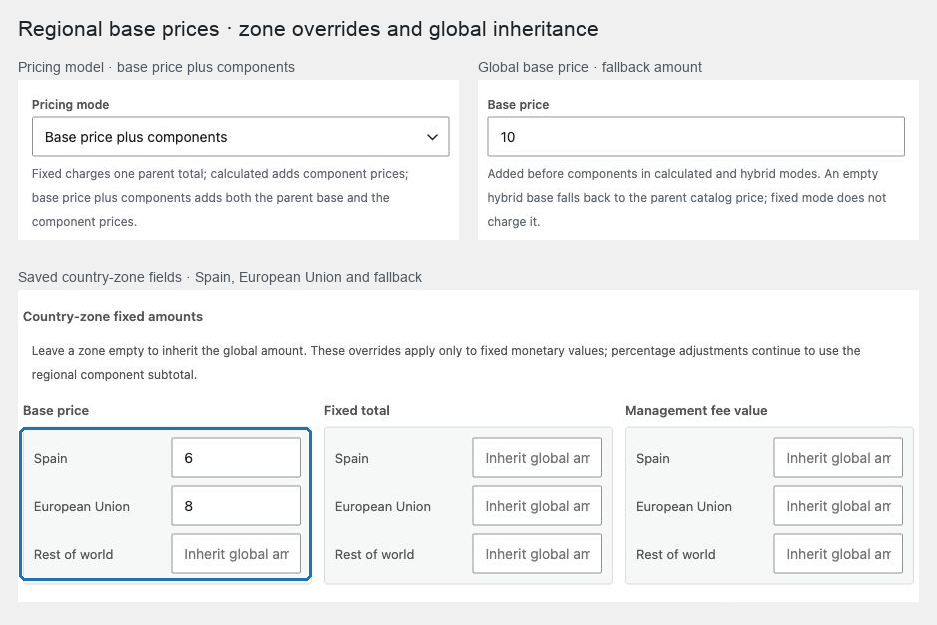
Example
For a hamper sold in Spain, the European Union, and the rest of the world:
- set a global base that applies everywhere unless overridden;
- enter a Spain and EU base when preparation costs differ;
- let each component use its resolved regional WooCommerce price; and
- use one global percentage management fee so it scales with each market subtotal.
Expected result
One market context is resolved for the parent and every component. That zone and pricing revision become part of quote and cart identity, so a country change cannot reuse a quote from another zone.
Verify and troubleshoot
Preview or browse the product in every configured market, then test cart, checkout-country change, Store API, tax display, and an order. Confirm empty zone fields inherit the global amount and explicit values override it.
If regional controls disappear, verify that Country pricing zones and the relevant zone are enabled. Hidden overrides are preserved; re-enable the valid zone to review or clear them intentionally.
Related: Price and ship Composite products and WooCommerce country-zone pricing.