
Prices
Fenómenus does not store "a price". It stores a price per serving format, and which formats exist depends on the menu type. That single design decision explains almost everything in this chapter.
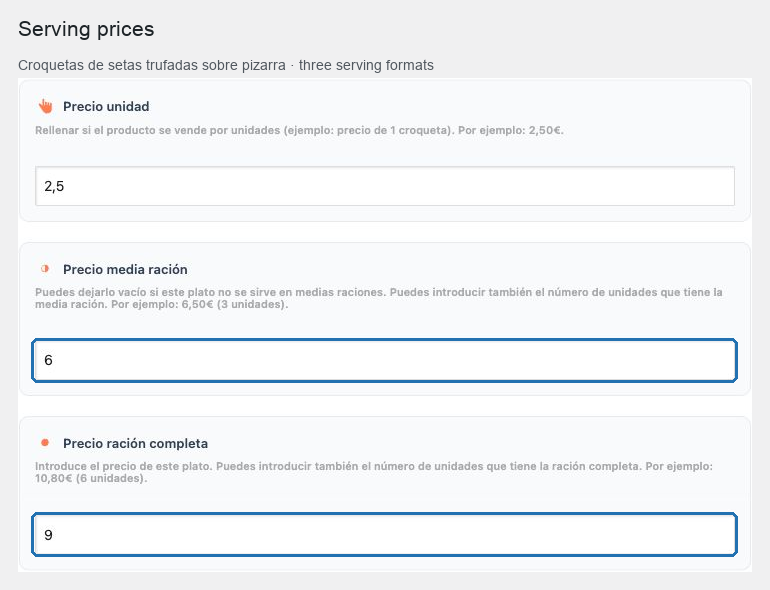
Every format, and where it lives
| Format | Menu types that have it |
|---|---|
| Full portion | À la carte, terrace, breakfast, desserts, bar menu |
| Half portion | À la carte, terrace, breakfast, desserts, bar menu |
| Unit | À la carte, terrace, breakfast, desserts, bar menu |
| Glass | Wine list, cocktails, beverages |
| Shot | Beverages |
| Bottle | Wine list, beverages |
| Magnum bottle | Wine list |
| Benjamin bottle | Wine list |
| Menu price | Tasting menu, set menu |
| Pairing price | Tasting menu |
A cocktail's single price uses the glass field, which the bulk table and the export label simply Price.
In this chapter
| Task | Article |
|---|---|
| Change prices quickly, without opening items | Edit prices in the list |
| Price dishes served whole and halved | Full and half portions |
| Price items sold by the piece | Unit prices |
| Price drinks by glass, shot and bottle | Glass, shot and bottle |
| Price large and small wine formats | Magnum and Benjamin |
| Price a whole menu and its pairing | Menu and pairing prices |
| Understand how guests see prices | How prices are displayed |
| Check a menu before publishing | Price entry checklist |
The rule that prevents most mistakes
Fill only the formats you actually serve. Leave the rest empty.
An empty field means the format is not offered, and nothing is shown for it. A 0 is a real price of zero and is displayed as one. A dish with a single price needs one field filled, not three with the same number in them.
Prices are text, not calculations
Fenómenus stores what you type. It does not compute totals, apply tax rates, convert currencies or round anything, and it has no concept of a discount.
That has one practical benefit — the price field can carry the detail a menu needs, such as 10,80€ (6 unidades) — and one obligation: the way prices are written must be decided once and applied consistently across every menu.
Prices and languages
Prices are shared across an item's translations rather than translated. A price entered once applies to every language, which is why a guest reading the English menu and a guest reading the Spanish menu can never be quoted differently.
Where prices appear
The same stored values are used by the public archive, the category navigation's item rows, and the generated PDF. Change a price once and every live output follows — except a PDF that was already generated, which is a snapshot and must be rebuilt.
Start with Edit prices in the list, which is where nearly all price work actually happens.