
Settings
POM Events keeps its configuration on one screen: Settings → POM Events, with four sections. Everything here is site-wide.
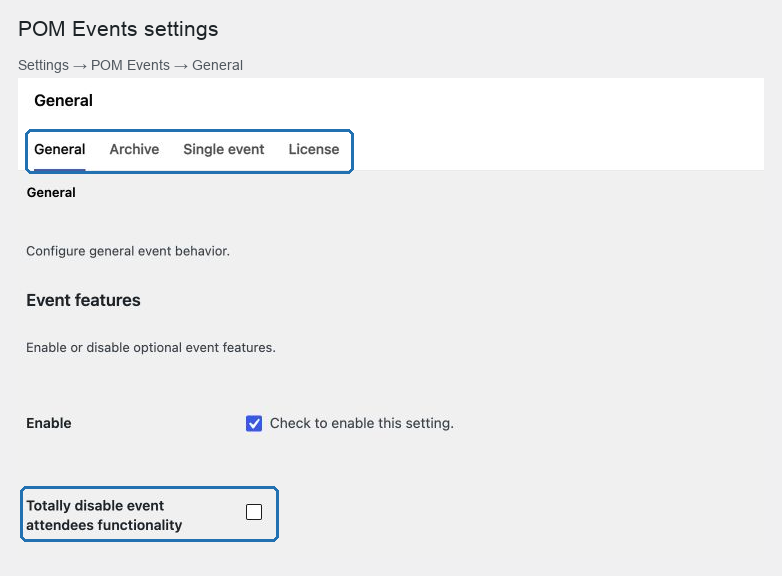
The four sections
| Section | Controls |
|---|---|
| General | Whether attendee functionality exists at all |
| Archive | Event lists: page size, dates, images, empty-result message |
| Single event | The event page: header, title, calendar link, go-back button, form clause, related content |
| License | The subscription key for this domain |
Access requires the capability to manage options.
In this chapter
| Topic | Article |
|---|---|
| Event lists and search results | Archive settings |
| Dates in lists, and the loading image | Date and loader settings |
| The single event page | Single event settings |
| The header band | Subheader settings |
| The registration form's site-wide parts | Form settings |
| Consent and the privacy link | Privacy settings |
| The related-content block | Related content settings |
| What to check after switching theme | Settings after a theme change |
| Every setting in one table | Settings reference |
Site-wide, not per event
Nothing on this screen changes one event. If a single event needs different behavior, look at the event's own Events settings panel instead.
The division is consistent:
| Decision | Where |
|---|---|
| Does this site take registrations? | Settings → POM Events → General |
| Does this event take registrations? | The event, Disable signup button |
| How many events per list? | Archive |
| When is this event? | The event, Date & Time |
| Do event pages show a title? | Single event |
| What does this event's button say? | The event, Registration form |
The one setting to decide first
General → Totally disable event attendees functionality.
It removes every attendee interface from the site: the registration form and attendants tabs on events, the attendee panel, the Assistants column, the public registration button and the remaining-places display.
Decide it during setup. Changing it after events are published changes what visitors see on every event at once.
Existing registrations are not deleted by it — they are hidden, and they return if you switch it back.
Where the plugin's own storage lives
POM Events owns its settings page and stores its values under its own namespace, separately from the theme's options. That is why the settings survive a theme change even though the event runtime does not — see Settings after a theme change.
Saving
Each section saves independently. Save before moving to another section, or the values you typed are discarded.
Start with Archive settings.