
Manage event attendees
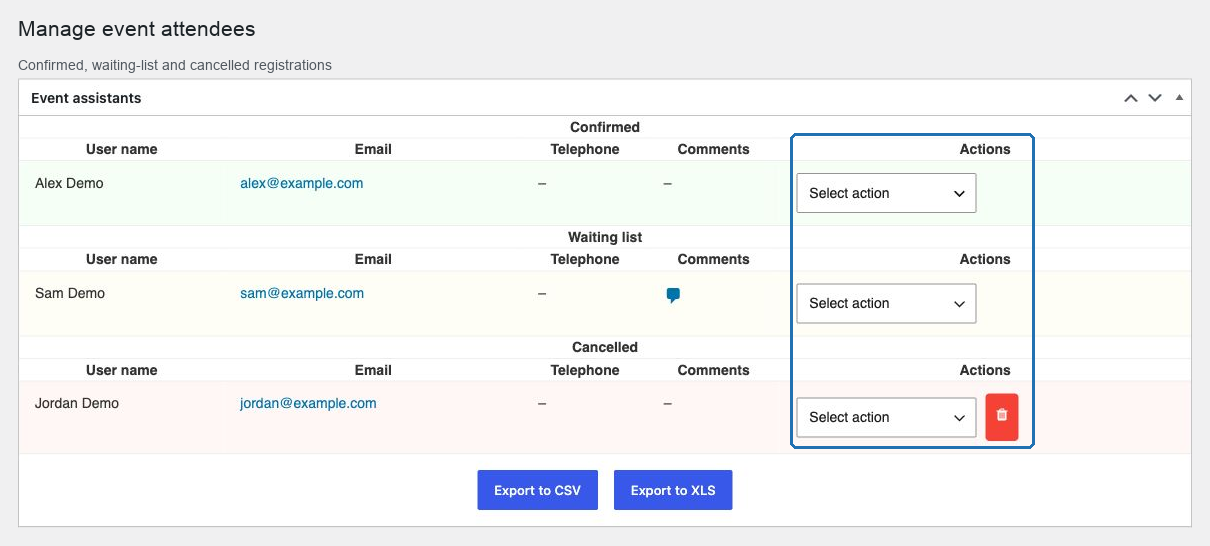
Every event with registration has an Event assistants panel listing who signed up, in three sections, with actions to move people between them and to export the whole list.
In this chapter
| Task | Article |
|---|---|
| Read the panel and the columns | The attendee list |
| Understand the three sections | Confirmed, waiting list and cancelled |
| Move someone between them | Move a registration between statuses |
| Run a door list on the day | Track attendance on the day |
| Read what people wrote | Review attendee comments |
| Manage a full event | Capacity and waiting list workflow |
| Get the list out as a file | Export to CSV · Export to XLS |
| Remove a registration for good | Delete a registration |
| Handle personal data properly | Attendee data and privacy |
| Fix something that looks wrong | Attendee management troubleshooting |
Where the panel is
Open the event and find Event assistants, above the content editor. It exists only when attendee functionality is enabled under Settings → POM Events → General.
The panel has three sections, each with the same columns:
User name · Email · Telephone · Comments · Actions
Below the table sit Export to CSV and Export to XLS.
The three sections
| Section | Meaning |
|---|---|
| Confirmed | Has a place |
| Waiting list | Queued, because the event was full when they registered |
| Cancelled | No longer attending |
A registration is always in exactly one of them, and you move it with the Actions control on its row.
What the events list tells you
All Events shows an Assistants column with the number of confirmed registrations — waiting-list and cancelled rows are not counted. That is the number to compare against the room's capacity.
Sort the list by Event start date to get a working view of what is coming and how full it is.
Three rules worth knowing before you start
Deleting a cancelled registration is permanent. There is no trash and no undo. Export first.
Nothing is emailed. Moving someone from the waiting list to confirmed does not notify them. Contacting people is a manual step and the plugin gives you their email and telephone to do it.
Attendee data is personal data. The panel and the exports contain names, email addresses, telephone numbers and free-text comments. Handle both accordingly.
The rhythm that works
- Watch the Assistants count as registrations arrive.
- Read comments as they come in, or at least the day before.
- Promote waiting-list people as places are released, and contact them.
- Export the list the day before the event — that file is your door list.
- After the event, export again for your records and clean up what should not be kept.
Start with The attendee list.