
Referencia de ajustes del pie de página
Abre Settings → POM Theme → Site layout → Footer → Footer general settings. para controlar la estructura común del pie de página. El contenido de los widgets sigue estando en Appearance → Widgets.
Apariencia general
El pie de página puede usar:
- Enable parallax
- Footer background image
- Colores de fondo, texto, enlaces y efecto hover del pie de página
- Footer font size
Establece estos valores para la estructura común. Cada fila de widgets habilitada puede luego reemplazar su propia paleta de fondo y texto donde una banda visual necesite diferenciarse.
La imagen transparente que usa internamente el efecto parallax tiene un texto alternativo vacío para que los lectores de pantalla la ignoren automáticamente. Mantén la información significativa en el texto, los enlaces o las imágenes de contenido del pie de página con el texto alternativo adecuado. Tras activar el parallax, comprueba que el desplazamiento preserva el diseño y que los usuarios de teclado aún pueden llegar a todos los enlaces del pie de página.
Filas de widgets
POM Theme admite tres filas. Al habilitar una fila se muestran:
- Un número de columnas de 1 a 12
- Un control de contenido a ancho completo
- Un ancho de 1 a 12 para cada columna generada
- Un ancho móvil aplicado a todas las columnas de esa fila
- Relleno superior e inferior
- Comportamiento de contenido centrado
- Colores de fondo y texto específicos de la fila
El número de filas y columnas guardado determina qué áreas de widgets Footer first row, Footer second rowy Footer third row registra WordPress.
Área de derechos de autor
Usa Copyright wrapper para habilitar el área inferior. Sus ajustes incluyen Copyright text, Footer credits, color de fondo y alfa, y color de texto.
Asigna un menú a Footer (above copyright) en Appearance → Menus → Manage Locations cuando el pie de página necesite una navegación compacta inmediatamente encima del contenido de derechos de autor.
Controles flotantes del pie de página
Puedes habilitar hasta dos acciones personalizadas independientes, con una flecha opcional de volver arriba. Los sitios existentes conservan su primera acción actual; la segunda está desactivada hasta que la habilites.
- Abre Settings → POM Theme → Site layout → Footer → Footer general settings. y localiza Footer floating icons.
- Usa Display floating secondary icon? para la primera acción personalizada.
- Habilita Display second custom floating icon? para la segunda acción. Sus ajustes están etiquetados como Second custom floating icon….
- Para cada acción, elige su tipo, icono, colores y forma. Añade append text para una etiqueta visible y un link aria label cuando un icono necesite un nombre accesible.
- Para Go to URL, establece la URL de destino y el destino del enlace. Para Open modal box, introduce el ID del modal sin el
#inicial. Las acciones de carrito y navegación requieren que el carrito lateral o la navegación correspondientes estén habilitados; la acción de menú móvil solo aparece por debajo del punto de corte de escritorio. - Habilita Display go to top arrow? solo si también quieres la flecha. Aparece tras desplazarte más de 400 píxeles y no sustituye a ninguna de las dos acciones personalizadas.
- Guarda los ajustes y revisa la página pública en escritorio y móvil. Si los estilos necesitan actualizarse, usa Compile assets.
Las dos acciones personalizadas aparecen una junto a la otra en una fila horizontal en escritorio y móvil. La primera acción aparece a la izquierda, seguida de la segunda acción y la flecha opcional. Las etiquetas largas se ajustan dentro de su propio botón en pantallas estrechas mientras los botones permanecen en una sola fila. La flecha se desliza a la vista sin superponerse a las acciones personalizadas. Cuando la flecha está desactivada, las acciones permanecen alineadas en el borde inferior derecho sin moverse al desplazarse. Los visitantes que solicitan movimiento reducido ven el cambio sin la animación de deslizamiento.
Dos acciones en una pantalla más grande:

Las mismas acciones en un teléfono:
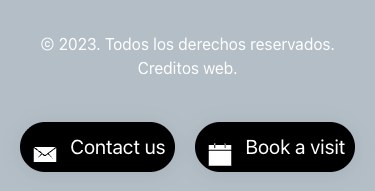
La URL de destino, el texto añadido y la etiqueta ARIA admiten las traducciones del tema de forma independiente para cada acción. Mantén las etiquetas concisas y verifica las traducciones más largas en pantallas estrechas.
Comprueba cada acción de enlace o panel, el inicio y el final de la animación de desplazamiento y el área de derechos de autor en la parte inferior de la página. Prueba la segunda acción por sí sola y también ambas juntas. Verifica que los controles no se superponen al floating contact dock.
Contenido reutilizable después del pie de página
Append reusable block muestra el bloque reutilizable seleccionado después del pie de página estándar. Úsalo para una sección de cierre verdaderamente compartida, no para contenido que pertenezca a una sola página.
Impacto del cambio
Cambiar el número de columnas de una fila habilitada cambia el conjunto de áreas de widgets registradas. Antes de reducir el número, revisa Appearance → Widgets y mueve cualquier contenido que aún deba aparecer.
Para la configuración inicial, sigue Build a footer from widget rows.