
Create and edit lessons
A lesson is the content students work through. Every lesson belongs to one course and one of that course's sections, and carries its own video, timing and access exceptions.
In this chapter
| Task | Article |
|---|---|
| Create a lesson from scratch | Create a lesson |
| Attach it to its course | Connect a lesson to a course |
| Place it in the outline | Assign a lesson section |
| Add a video | Lesson video |
| Get the provider and URL right | Video source and URL |
| Tell students how long it takes | Estimated time |
| Open one lesson to everyone | Lesson previews |
| Give one lesson a different rule | Lesson permission override |
| Write the blocked-lesson text | Lesson no-access message |
| Look up any field | Lesson editor reference |
Where the fields are
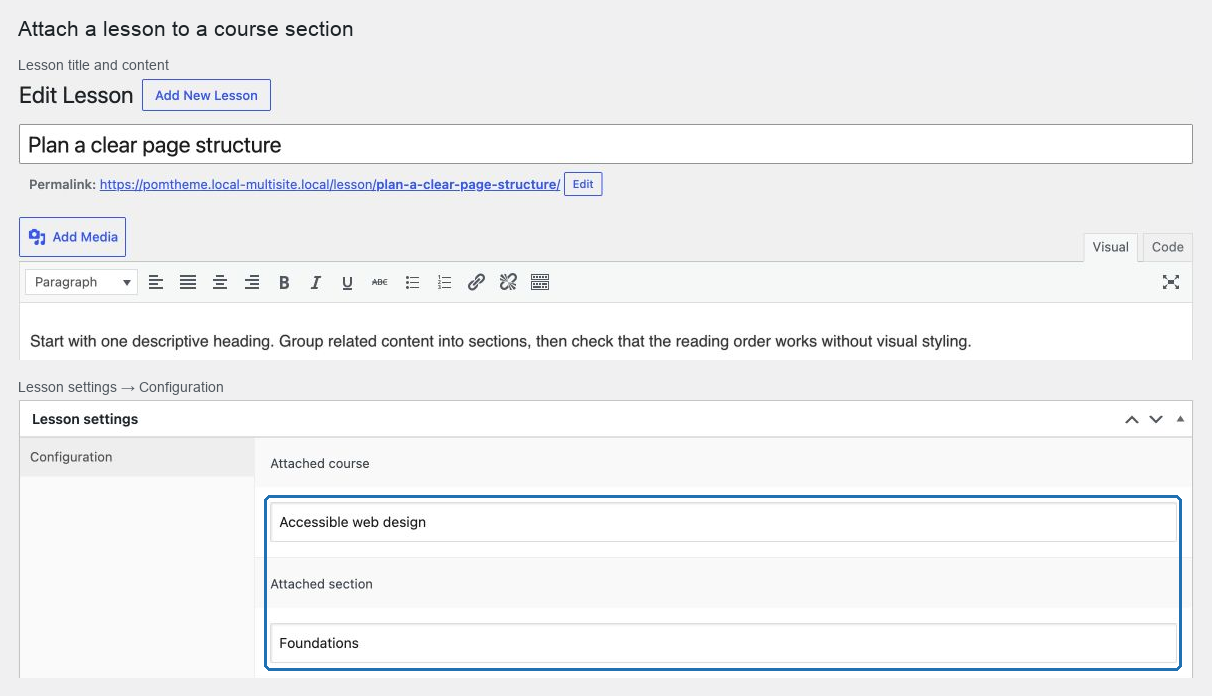
Lessons live under Courses → Lessons. Open one and find Lesson settings below the content editor, with a single Configuration tab holding everything specific to a lesson.
The title, content and featured image are the ordinary WordPress fields above, and the order attribute — which decides the lesson's position — is in the page attributes.
The two fields that decide whether a lesson exists for students
| Field | Missing means |
|---|---|
| Attached course | The lesson's URL returns a not-found result |
| Attached section | The lesson is absent from the course outline, though its URL works |
The lesson list shows both as columns, so a scan down the Section column finds every lesson that students cannot see.
Fill the fields in this order
- Title and content.
- Attached course, then save.
- Attached section — the list is built from the course you just attached.
- Video, estimated time.
- Order attribute.
- Preview or permission override, if this lesson is an exception.
- Publish.
Saving between steps 2 and 3 is not optional; the section selector cannot know its options until the course is stored.
Lessons inherit almost everything
By default a lesson takes its access rules, its no-access text and its back-link wording from its course. The lesson-level fields exist for exceptions — a preview, a bonus module, a lesson with a different requirement.
Use them sparingly. A course where every lesson overrides something is a course whose access model needs rethinking.
Start with Create a lesson.