
Create and edit courses
A course is the landing page students reach first and the container that decides who can go further. This chapter covers every field on it.
In this chapter
| Task | Article |
|---|---|
| Write the parts every course needs | Title, description and image |
| Build the outline's structure | Course sections |
| Put lessons into those sections | Assign lessons to sections |
| Require students to sign in | Require login |
| Gate the course by role, purchase or subscription | Course permission rules |
| Sell access to a course | Mark a course as paid |
| Decide whether previews need an account | Allow previews before login |
| Show a login form on the course | The login form on a course |
| Write what a blocked student reads | The no-access message |
| Write the blocked-lesson message | The "lesson not available" message |
| Link products from the message | The related product links merge tag |
| Change the back link's wording | The "go back to course" label |
| Look up any field quickly | Course editor reference |
Where the fields are
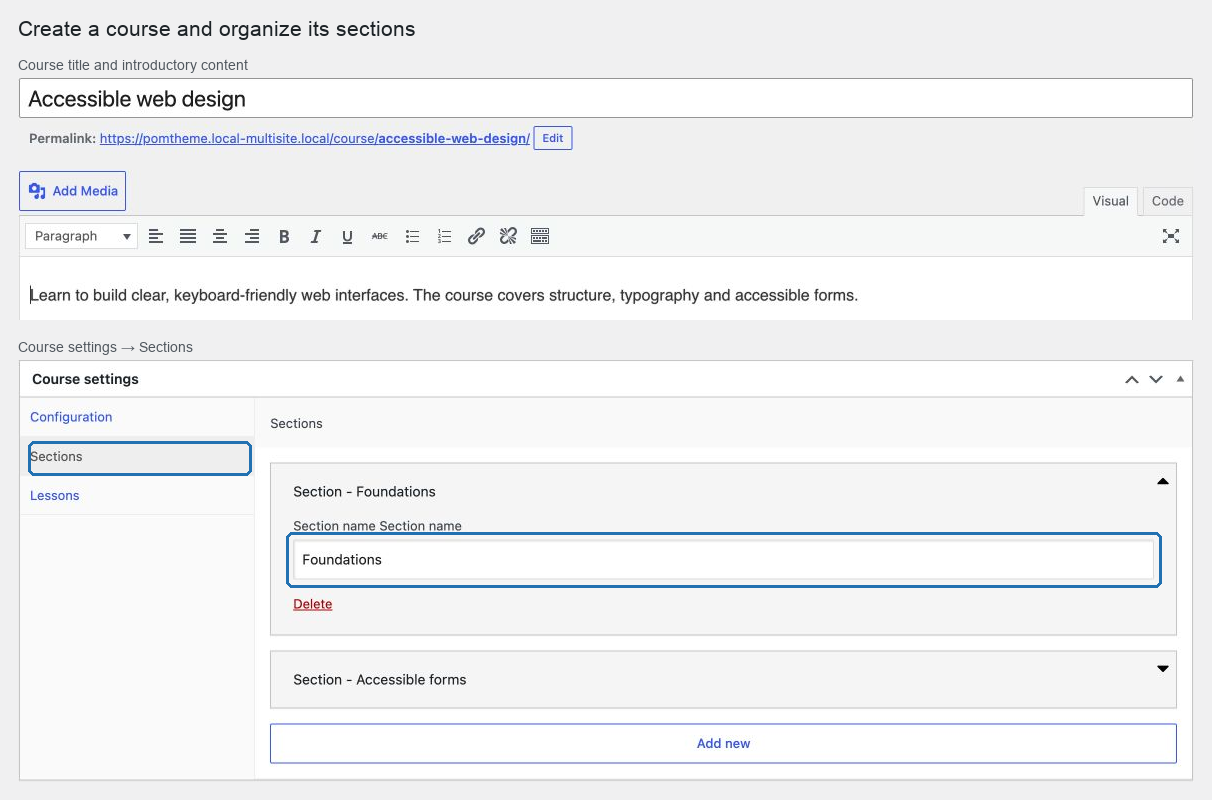
Open a course and find Course settings below the content editor, with three tabs:
| Tab | Contains |
|---|---|
| Configuration | Login requirement, preview login, paid course, permission rule, login form, no-access content |
| Sections | The named sections the outline is built from |
| Lessons | The "Lesson not available" text and the "Go back to course" label |
The course's own title, description and image are the ordinary WordPress fields above.
Build a course in this order
- Title, description and featured image.
- Sections.
- Lessons, each attached to the course and to a section.
- The access model.
- The no-access message.
- Test with a real student account.
Doing sections before lessons matters: a lesson's section selector is built from the course it is attached to.
Two things that decide whether a course works
Every lesson needs a course and a section. A lesson missing either is invisible to students, in different ways — one returns a not-found result, the other is simply absent from the outline.
Every gated course needs a message. A student who cannot get in should read an explanation, not an empty page.
Start with Title, description and image.